Case study, a large US public school district
Three paper processes, redesigned for a new system
A large US public school district ran HR changes, purchasing and travel claims for 130+ schools on paper, color-coded copies and basket mail. Ahead of a system upgrade, our three-person team worked out how each should run on the new one. I led the inquiries and current-state maps, and put together the vision books.
- Role
- Design Consultant
- Timeline
- 6 months
- Team
- 3-person HCD team
- Scale
- 130+ schools, 6,000+ employees
- 60+recommendations for the upgrade
- 16service blueprints
- 191pages across three vision books
01
Paper, colored copies and basket mail
The district ran its core administrative work almost entirely on paper. Staff moved between fragmented systems, color-coded paper copies, physical filing rooms and basket mail, the internal mail that added a day or two to every handoff.
The same details were entered into several systems and formats, up to seven in one process. Nobody downstream heard when information changed hands, staff in schools had no access to the system at all, and workloads were tracked in paper files and email inboxes. With an enterprise system upgrade on the way, the district needed a user-centered vision for how these processes should work on it.
02
Many roles, and nobody with the whole picture
We ran contextual inquiries with 17+ roles across the three departments, from financial secretaries in schools to department directors, and mapped 34 roles across the processes in all.
- 8
Frontline staff
School administrators, financial secretaries and support staff
- 12
Specialists
HR, procurement and accounting staff doing the daily processing
- 6
Leadership
Directors, board members and approvers along the chain
- 5
External
Vendors, contractors and the systems that act in the flows
- 3
Cross-functional
Investigators, evaluators and compliance teams
No one person held the whole process.
Each role knew its own steps well, but the processes were so intertwined that the full picture only came together over several rounds of validation, with each role filling in what the others could not.
03
The blueprints had to work for the people in them
We documented 20+ current-state workflows as service blueprints. After the first validation session it was clear that most employees did not read blueprints or process flows intuitively.
So I changed the approach for every session after it: either a short walkthrough of how to read a blueprint before we started, or a simpler visual language that met people where they were. Untangling processes this intertwined into clear pictures also took more drafts than I expected.
04
The future state, drawn as screens
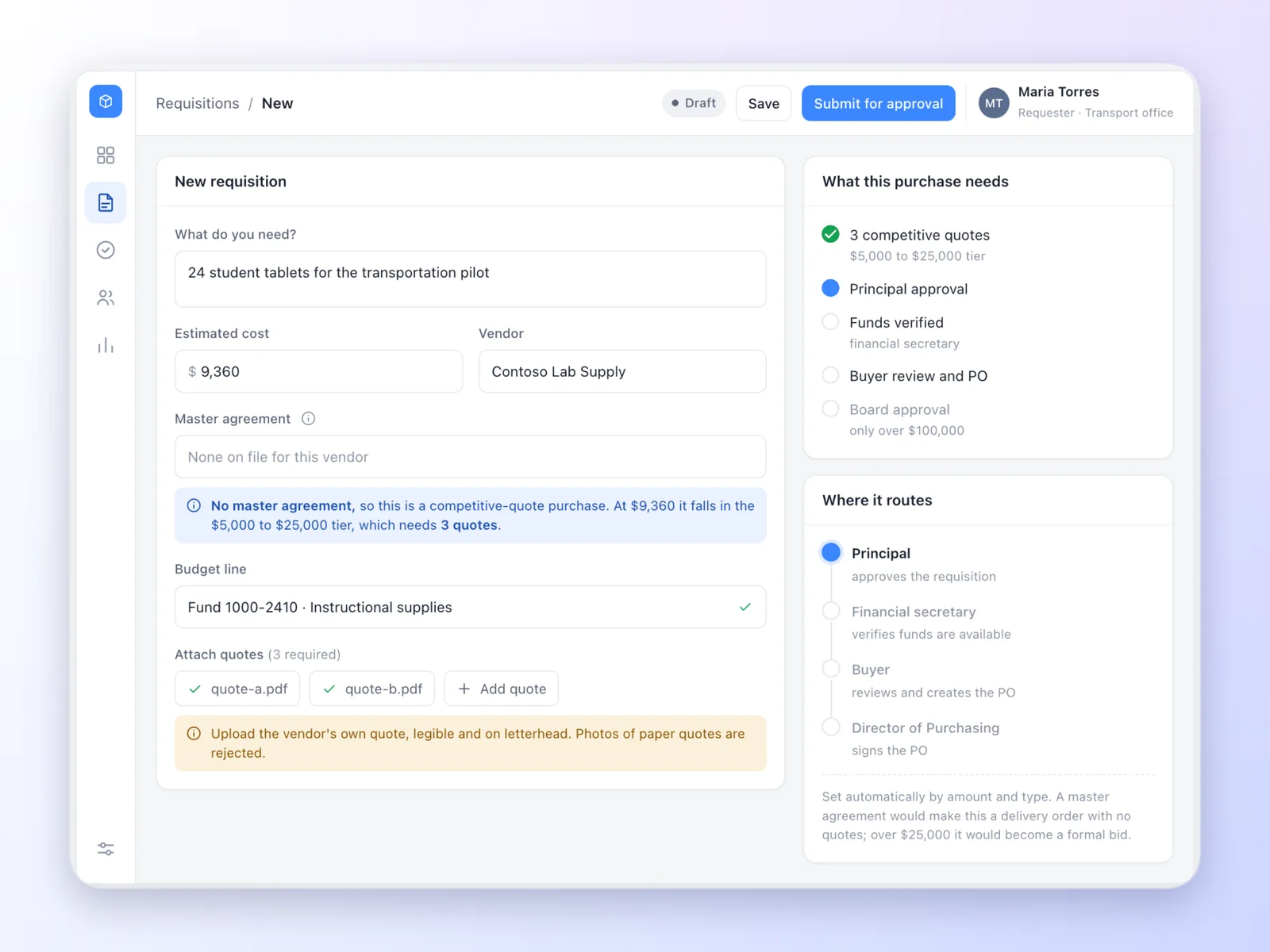
In workshops with the district's stakeholders and technical experts, we designed 20+ future-state workflows around three ideas: simplify the entry points, automate the handoffs, and connect the systems and roles. To show what that means in practice, I later redrew the request-to-purchase-order flow as screens, to the future state the project proposed.
-
Replaces: guessing the form and the quotes
A request that knows the rules
The school says what it needs and what it costs, and the form works out the rest: whether a master agreement applies, how many quotes the amount needs, and where the request will route. Conditions appear only when they apply.
-
Replaces: the five-copy paper trail
A buyer's worklist
Every open request in one list, with what needs action and what is due soon, so aging requests show up before they are late instead of after.
-
Replaces: hand-built purchase order packets
A purchase order built from the request
The purchase order carries the request's details over, lists the checks still to clear, and answers the questions buyers actually get stuck on, such as which commodity code to choose.
-
Replaces: basket mail between approvers
An approval route set by the purchase
The route is built from the amount and the type of purchase, and adds a Board review only for contracts of $100,000 or more. Sending back is instant and needs a reason, and the Director of Purchasing can sign from a phone.
05
What the district got
Three vision books, 191 pages in all, with 60+ recommendations tied to what the new system could do and to the process changes around it. The work directly informed the technical configuration and the change management strategy for the upgrade.
HR personnel actions
Seven form formats and 8+ tools for new hires, transfers and separations, brought into one digital form with configurable approvals and automatic notices downstream.
56-page vision book
Procurement
10+ flows, from school purchases to competitive bids and construction change orders, made digital end to end, with a self-service portal for vendors.
91-page vision book
Travel and expense
100 to 200 paper mileage claims every two weeks, moved to a digital workflow with mapping for mileage, real-time budget checks and status updates.
44-page vision book
"The strategy book will be really helpful in directing our efforts in the right direction."
"Getting everyone to come together to share how tech helps them do their job and unanimously agree to what needs to be done is a major piece that has been missing for me."